Project Highlights
Executive Summary
A Growing Indian E-commerce Retailer running its online store on WordPress and WooCommerce wanted to keep customers informed about their orders on WhatsApp. Order confirmations and shipping updates were being communicated manually, which did not scale as order volume grew.
NIMU Technologies designed, built, and deployed a custom WooCommerce WhatsApp integration using the Meta WhatsApp Business Cloud API. A purpose-built WordPress plugin listens to WooCommerce order events and AfterShip tracking updates, queues notifications through WooCommerce Action Scheduler, and sends approved WhatsApp message templates to customers automatically. The project covered the full Meta WhatsApp Business setup, resolution of an access-token app-mismatch issue during configuration, template creation and approval, and a staged validation process using a Dry Run mode before the integration was switched to live production.
Implementation status: Completed and deployed. Automated WhatsApp order notifications are live for new orders and shipments, with a review-request workflow available through a dedicated delivery event hook.
What NIMU Technologies Delivered
- Meta WhatsApp Business Cloud API configuration
- Meta app, system user, and access token troubleshooting
- WhatsApp template creation and approval
- WooCommerce order event integration
- AfterShip tracking integration
- Custom WordPress plugin development
- Phone number normalization
- Background processing with WooCommerce Action Scheduler
- Production Dry Run validation
- Production deployment
- Live notification automation
Client Profile
- Client: A Growing Indian E-commerce Retailer (name withheld for confidentiality)
- Industry: Online retail / e-commerce
- Platform: WordPress + WooCommerce
- Existing shipping workflow: AfterShip for shipment tracking
- Target communication channel: WhatsApp
Business Challenge
As the store grew, keeping customers updated became a recurring operational task rather than an occasional one. Before this project:
- Order updates were communicated manually. Confirmations and shipping details depended on someone on the team sending them, which meant delays during busy periods and inconsistent messaging.
- Customers needed timely updates. Buyers who have just placed an order, or are waiting for a parcel, want to hear about it without having to ask.
- Shipping information lived in a separate tool. Tracking numbers and courier details were already in AfterShip, but there was no automatic bridge between that data and the customer's WhatsApp.
- There was no single, automated communication workflow covering the order lifecycle from purchase to shipment to post-purchase feedback.
The retailer needed its existing WooCommerce and shipping workflows connected to WhatsApp, without changing how the team processed orders day to day.
Project Objective
Integrate WooCommerce with the Meta WhatsApp Business Cloud API so that customers automatically receive WhatsApp order notifications for important order lifecycle events:
- A new order notification when an eligible order reaches the configured order status
- An order shipped notification when new eligible tracking information becomes available in AfterShip
- An order review request tied to a delivery event, inviting the customer to share feedback
All of this had to run automatically, use only Meta-approved message templates, keep API credentials on the server, and reduce the risk of unnecessary duplicate notifications.
Technical Challenges
A WhatsApp Business API integration looks simple from the outside: "send a message when an order is placed." The engineering work sits in the details:
- Meta platform configuration: The WhatsApp Business Cloud API depends on several Meta assets (a Meta app, a WhatsApp Business Account, a registered phone number, and a system user with the right permissions), all of which must be correctly connected to each other.
- Template-only messaging: Business-initiated WhatsApp messages must use pre-approved templates, so every notification needed an approved template and exact parameter mapping.
- Separating shipping from delivery: WooCommerce order statuses do not reliably represent real-world shipping or delivery. Shipping notifications had to be driven by actual tracking data from AfterShip, not by an order status change.
- Phone number quality: Customer numbers entered at checkout vary in format (with or without country code, spaces, leading zeros). The WhatsApp Cloud API expects a consistent international format.
- Not slowing down the store: Calling an external API during checkout or an admin status change can add latency or fail on a network hiccup. Notifications needed to be processed asynchronously.
- Duplicate prevention: Order statuses can be changed more than once, and tracking data can be re-synced. The system needed a way to recognise when a notification had already been processed.
- Safe go-live: The integration had to be validated against real production orders without sending unintended messages to real customers.
Proposed Solution
Rather than relying only on a generic notification plugin, NIMU Technologies built a dedicated WooCommerce-to-WhatsApp automation layer as a custom WooCommerce plugin. This gave the retailer control over which events trigger messages, which orders qualify, how template parameters are built, and how processing is recorded.
The solution combines four pieces:
- WooCommerce order events as the trigger for new-order notifications
- AfterShip tracking data as the trigger for shipping notifications
- WooCommerce Action Scheduler as the background queue for all sends
- Meta WhatsApp Business Cloud API with approved templates for sending to the customer's WhatsApp
Solution Architecture
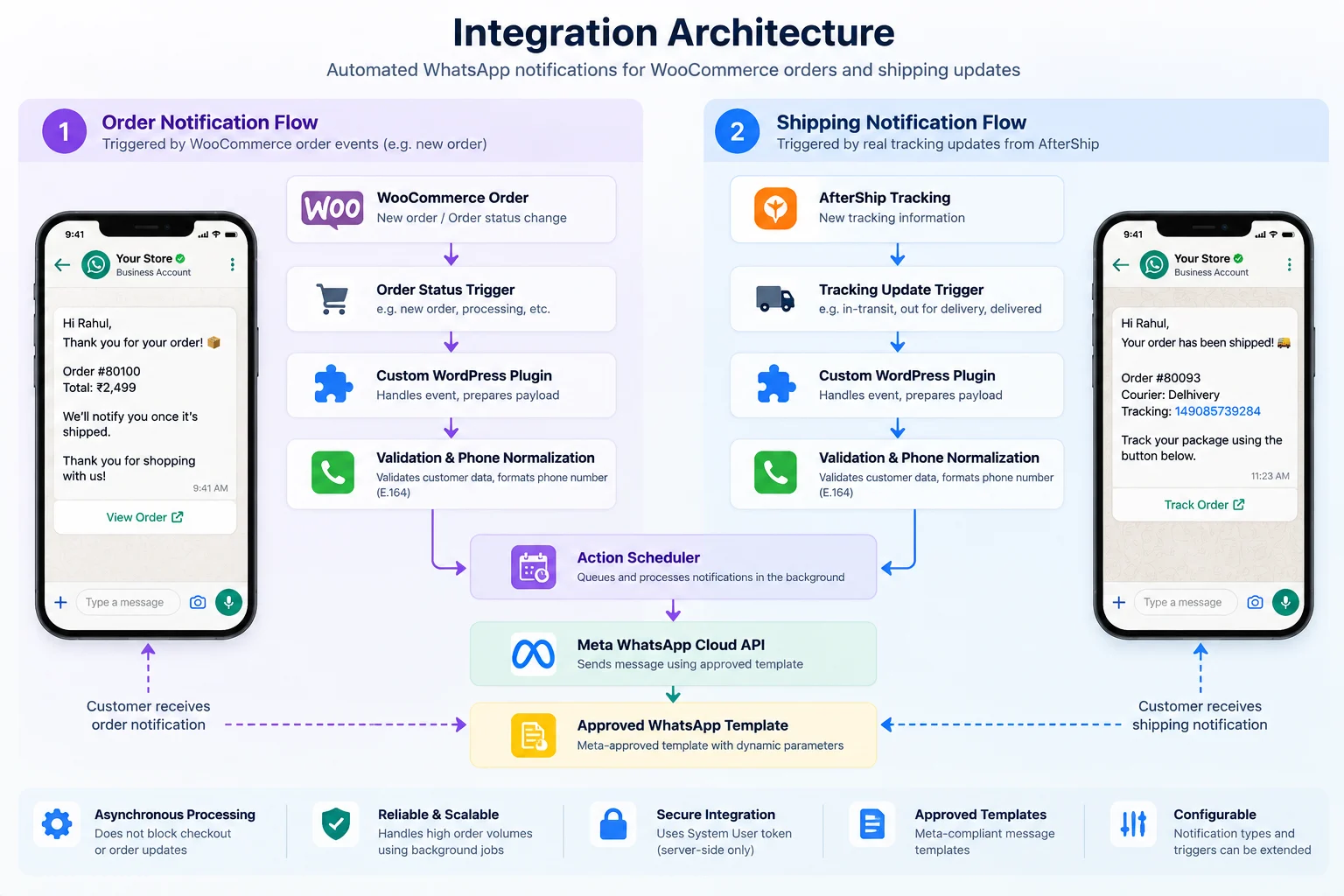 Tap to view the full-size architecture diagram
Flow 1: Order Notification
Flow 2: Shipping Notification
The key design decision is that the plugin never calls the WhatsApp API directly from the event itself. Events only decide whether a notification should happen and queue it; the actual API call happens in a background job. This keeps the storefront and admin responsive and isolates API issues from order processing.
WooCommerce Integration
The plugin hooks into WooCommerce order status transitions. When an order moves into the configured status, the plugin:
- Checks whether the order qualifies for a notification (for example, that it has a usable phone number and has not already been processed for this event)
- Normalizes the customer's phone number into the international format expected by the WhatsApp Cloud API
- Builds the template parameters from the order: customer name, order number, and order total
- Queues a background job in Action Scheduler to send the approved new-order template
Because the trigger status is configurable, the retailer can align WooCommerce order notifications with how their team actually processes orders, rather than being tied to WooCommerce defaults.
WhatsApp Business Cloud API Integration
NIMU Technologies handled the complete Meta-side setup required for production messaging:
- Configured the Meta WhatsApp Business Cloud API for the retailer's business
- Connected the retailer's production WhatsApp Business number
- Created and configured a Meta System User access token for server-to-server API access
- Stored the API credential securely on the server side, never exposed in the browser or front-end code
- Verified the API connection before any production traffic was enabled
Messages are sent through Meta's Graph API using approved templates. A system user token was used rather than a personal account token, so the WhatsApp Cloud API integration does not depend on an individual's login session.
Meta API App-Mismatch Resolution
During the Meta WhatsApp Business setup, generating and configuring the access token failed because of an app mismatch: the token was not aligned with the Meta app that the WhatsApp Business configuration was connected to. In this state, the token could not be used to send messages through the intended WhatsApp Business Account.
The team investigated the configuration across the Meta app, the system user, and the WhatsApp Business assets, corrected the setup so that all of them pointed to the same configuration, and then regenerated the token with the permissions required for WhatsApp messaging. The API connection was then verified successfully before moving on to template work.
This configuration can be a point of friction because Meta's setup spans multiple dashboards and connected business assets. Treating credential setup as a verified step, not an assumption, avoided having to debug it later under production conditions.
WhatsApp Template Management
Every automated message uses a WhatsApp template approved by Meta. As part of the project, NIMU Technologies:
- Created and submitted three templates (new order, order shipped, and review request) and obtained approval
- Synchronized the approved templates with the custom WordPress plugin, so the plugin sends exactly what Meta approved
- Implemented parameter mapping for each template:
- New order: customer name, order number, order total
- Order shipped: customer name, order number, courier name, tracking number
- Review request: an approved template inviting the customer to share feedback on their order
Keeping template names and parameters in sync with the plugin matters: if a template's variables do not match what the API call sends, Meta rejects the message.
AfterShip Integration
Shipping notifications are driven by real tracking data, not by a WooCommerce status. The plugin integrates with the retailer's existing AfterShip WooCommerce tracking workflow. When eligible new tracking information is detected, it:
- Identifies the courier
- Extracts the tracking number
- Queues a shipping notification in Action Scheduler
- Sends the approved shipping template to the customer's WhatsApp with their name, order number, courier, and tracking number
Shipping and delivery are treated as separate events. The WooCommerce "Completed" status is not assumed to mean an order has been delivered. The review-request workflow is connected to a dedicated delivery event hook, so feedback requests can be tied to an actual delivery signal rather than an internal order status.
Custom WordPress Plugin
All of the WordPress WhatsApp integration logic lives in a custom plugin developed and deployed specifically for this retailer. Keeping it in a dedicated plugin, rather than in the theme or scattered snippets, means it survives theme changes, can be enabled or disabled cleanly, and can be maintained independently.
The plugin is responsible for:
- Monitoring configured WooCommerce order status changes
- Validating whether an order qualifies for a notification
- Normalizing customer phone numbers
- Building WhatsApp template parameters
- Queuing notification processing through WooCommerce Action Scheduler
- Sending approved templates through Meta's Graph API
- Recording the notification processing state per order to help prevent unnecessary repeat notifications
- A Dry Run mode for validating payloads in production without sending messages to customers
Asynchronous Notification Processing
Why asynchronous processing? WhatsApp API calls are handled in the background instead of blocking checkout or order-status processing.
WooCommerce Action Scheduler, the same background-job system WooCommerce uses internally, handles every send. This design has practical benefits:
- Checkout and admin are not held up. Placing an order or changing its status does not wait for an external API call.
- API issues stay isolated. If the WhatsApp API is briefly unavailable, order processing is not directly affected.
- Visibility. Queued, completed, and failed actions can be reviewed from the WooCommerce admin's scheduled actions screen, which makes troubleshooting straightforward.
Combined with the per-order processing state, this reduces the chance that a status being changed back and forth, or tracking data being re-synced, results in an unnecessary repeat message.
Testing & Validation
Safe Production Rollout
The integration was validated against real production events before customer-facing messaging was enabled. Because every message goes to a real customer's phone, validation was staged carefully:
- PHP and plugin functionality tested
- Phone number normalization tested across different input formats
- WooCommerce order notification flows tested
- Meta API connection verified
- All three approved WhatsApp templates tested successfully through the Meta API
- Automatic New Order and Shipped triggers tested in the production environment using Dry Run mode: the plugin ran its full logic against real orders but did not send messages
- Production payloads verified for correct template names, parameters, and phone formats
- Dry Run disabled only after validation was complete
Production Deployment
The custom plugin was deployed to the retailer's production WordPress and WooCommerce environment and configured with:
- The Meta WhatsApp Business Cloud API and production WhatsApp Business number
- The three approved WhatsApp templates
- WooCommerce order automation
- WooCommerce Action Scheduler for background processing
- AfterShip tracking detection
- Secure server-side API authentication
After Dry Run validation, the integration was switched to live production mode.
Key Capabilities
- Automated WhatsApp order notifications for new orders at a configurable order status
- Automated WhatsApp shipping notifications driven by AfterShip tracking data
- Review-request workflow triggered through a dedicated delivery event hook
- Approved-template messaging via the WhatsApp Cloud API
- Configurable notification controls: notification types and eligible WooCommerce order statuses can be configured independently
- Phone number normalization for WhatsApp-compatible formats
- Asynchronous processing with WooCommerce Action Scheduler
- Per-order processing state that helps prevent unnecessary repeat notifications
- Dry Run mode for safe validation in production
Business Benefits
Operational Benefits
- Reduced manual communication effort for order confirmations and shipping updates
- Automated order and shipping notifications, timely and automatically queued when the configured triggering event occurs
- Consistent customer communication: each notification type uses the same Meta-approved template and parameter structure
- Existing AfterShip workflow reused for shipping communication, with no separate tracking process
- Background processing that keeps notification work away from checkout and order handling
Technical Benefits
- Custom event-driven architecture built around the retailer's own WooCommerce automation
- Meta-approved templates with explicit parameter mapping
- Server-side credential handling using a system user token
- Asynchronous processing through WooCommerce Action Scheduler
- Notification state tracking per order
- Dry Run validation for safe changes in production
- Extensible architecture: additional notification types can be introduced through new approved templates and event triggers as business requirements evolve
Security & Data Protection Considerations
- Server-side credentials: The Meta access token is stored only on the server and used only in server-to-server API calls. It is never sent to the browser.
- System user access: A Meta System User token was used for the integration rather than a personal account token.
- Minimal data in messages: Templates include only what the customer needs: name, order number, order total, courier, and tracking number.
- Confidentiality: No production identifiers, credentials, customer data, or order data are disclosed in this case study.
- Messaging policies: Business-initiated WhatsApp messages are subject to Meta's policies, including customer opt-in requirements and per-message pricing. Businesses running this kind of integration should keep opt-in practices and costs under review.
Technology Stack
- Platform: WordPress, WooCommerce
- Language: PHP
- Messaging: Meta WhatsApp Business Cloud API (Graph API), WhatsApp message templates
- Background processing: WooCommerce Action Scheduler
- Shipment tracking: AfterShip
- Integration layer: Custom WordPress plugin
Conclusion
For A Growing Indian E-commerce Retailer, the value of this project was not "sending WhatsApp messages". It was connecting existing order and shipping workflows to WhatsApp in a way that runs automatically, guards against unnecessary repeat notifications, and was validated on production events before it went live. A custom plugin, a background queue, event-driven triggers, and a careful Dry Run rollout turned a manual task into an automated part of the order lifecycle.
Need WhatsApp automation for your WooCommerce store?
We can help connect WooCommerce with the WhatsApp Business Cloud API, shipping platforms, and other business systems through a custom integration. See our WhatsApp Business API integration, WooCommerce development, and third-party API integration services.
Discuss Your Integration Explore WooCommerce Development
Frequently Asked Questions
Can WooCommerce send order notifications on WhatsApp automatically?
Yes. With a WooCommerce WhatsApp integration built on the WhatsApp Business Cloud API, order events such as a new order or a shipment can trigger approved WhatsApp templates automatically, without anyone sending messages manually.
Can WhatsApp be integrated with an existing WooCommerce store?
Yes. A custom integration can connect WooCommerce order events with the Meta WhatsApp Business Cloud API without replacing the existing store workflow.
Why use a custom plugin instead of a generic WhatsApp plugin?
A custom plugin gives control over which events trigger messages, which orders qualify, how template parameters are mapped, how repeat notifications are controlled, and how the integration connects to existing tools such as AfterShip. Generic plugins may not match a store's specific workflow.
Can shipping notifications use tracking information?
Yes. Tracking data from systems such as AfterShip can be used to trigger shipping notifications, including the courier name and tracking number.
Can the integration support other notifications?
Yes. Additional approved WhatsApp templates and event triggers can be added depending on the business workflow and Meta's applicable messaging requirements.
Do customers need to opt in to receive WhatsApp notifications?
Yes. Businesses should collect and maintain appropriate customer opt-in in accordance with Meta's applicable WhatsApp Business policies before sending business-initiated messages.
Is WhatsApp Business API messaging free?
No. Meta charges for business-initiated template messages according to its current pricing for each category and country. Costs should be reviewed as part of planning any WhatsApp API integration for WooCommerce.
Is every WhatsApp notification guaranteed to be delivered?
No. Delivery depends on factors such as whether the customer's number is valid and active on WhatsApp and Meta's own delivery rules. A well-built integration handles failures so they do not disrupt order processing.
Does the WooCommerce "Completed" status mean an order was delivered?
Not necessarily. "Completed" is an internal order status. In this project, shipping notifications are driven by AfterShip tracking data, and the review request is tied to a separate delivery event hook rather than the Completed status.