Most AI deployed inside businesses today still works the way a very fast intern would: you ask, it answers, you decide what to do with the answer. That is changing quickly. AI agents do not just produce a recommendation — they open browser sessions, call internal and third-party APIs, read and write files, query databases, and chain several of those actions together to finish a task on their own.
That shift is exactly why AI agents are useful, and exactly why they need a different security conversation than a chatbot does. The moment software can take action instead of only suggesting one, the question changes from "is the answer accurate?" to "what did it actually do, who allowed it to do that, and can we stop it if it goes wrong?" This guide covers the controls a business should have in place before handing an AI agent real permissions — not as a theoretical framework, but as a practical checklist for anyone about to put one into production.
What Actually Makes an "Agent" Different
A chatbot answers inside a conversation. An agent is given a goal and a set of tools, and decides for itself which tools to use, in what order, to reach that goal. That could mean querying a CRM, drafting and sending an email, updating a record, calling a payment API, or executing a script — often several of these in sequence, without a person reviewing each step.
The capability is the point. It is also the risk. Every tool an agent is wired to is a permission the business has granted, whether anyone wrote it down as a policy or not.
The Core Problem: Autonomy Without Accountability
Give an agent broad access "to be safe" and you have not made it safer — you have made its blast radius larger. A support agent that can read order data does not also need the ability to delete database records, change payment configuration, or create administrator accounts, no matter how convenient blanket access is during a demo. The industry term for the fix is not new: least privilege — an agent gets exactly the permissions its task requires, and nothing else, and that boundary is enforced in code, not left to the agent's own judgment about what it should or should not do.
The second half of the problem is visibility. If an agent finishes a task and reports only "done," nobody can answer the questions that actually matter after an incident: which systems did it touch, which credentials did it use, and did it attempt something outside its scope. Without a real record, "the agent handled it" is a claim, not a fact.
Five Controls Every AI Agent Deployment Needs
1. Granular, task-scoped permissions
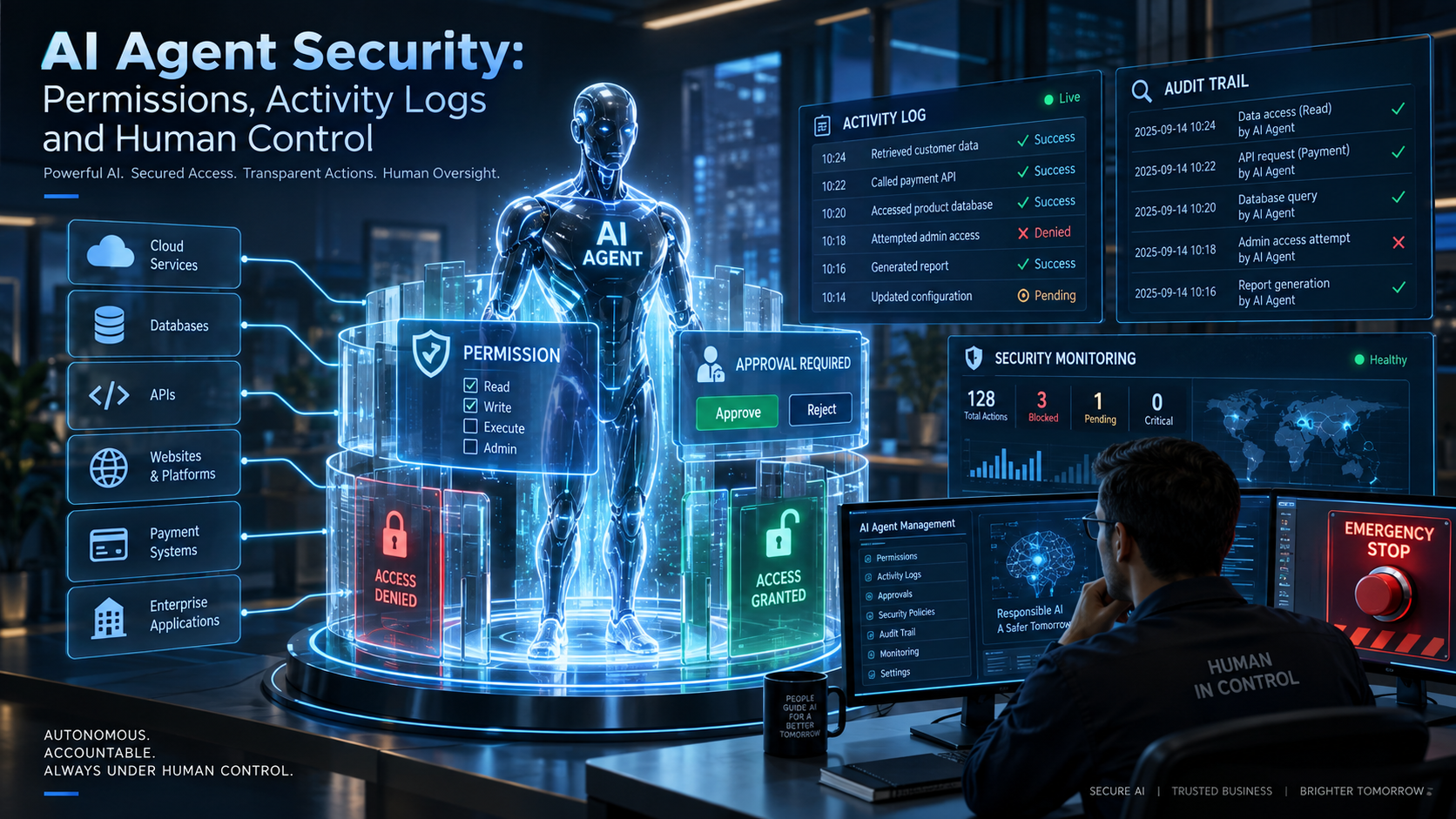
Break access down by capability, not by "on or off." A useful starting table looks like this: reading public or internal data is auto-approved; sending email, modifying customer records, or writing to a production system requires approval or heavy logging; deleting data, changing payment settings, and creating credentials are denied outright, regardless of how the request is phrased. This mapping should live in policy and be enforced at the code and infrastructure level.
2. A complete, timestamped activity log
Every API call, file read, database query, and tool invocation an agent makes should be logged with a timestamp, the resource touched, and — critically — the reason the agent gave for taking that action. This is what turns "the scan completed successfully" into an actual audit trail: what was accessed, when, why, and whether it was inside or outside policy. Without it, a security audit after an incident has nothing to work from.
3. Risk-tiered approval, not approval for everything
Requiring a human to approve every single action does not scale past a handful of tasks a day, and teams route around controls that get in the way that often. A workable model sorts actions into three tiers: low-risk (read data, generate reports) runs automatically; medium-risk (update records, send communications) runs but is logged in detail for review; high-risk (transfer money, deploy to production, delete data, change access levels) is blocked until a person explicitly approves it. This keeps the agent autonomous for the large majority of actions that do not need a person, while keeping a human between the agent and anything expensive to get wrong.
4. Short-lived, scoped credentials — never a standing admin password
An agent that authenticates with a permanent administrator password turns any prompt-injection bug, compromised dependency, or plain misconfiguration into a full system compromise. Scoped API keys, time-limited tokens, and read-only database roles limit what a compromised agent session can actually do, and they can be rotated or revoked without touching a human user's credentials. If the agent only ever needed read access to one table, it should hold a token that can only do that.
5. A kill switch that actually cuts access
Every autonomous system needs a way to be stopped that does not depend on the system itself cooperating. That means a control, external to the agent, that can terminate active sessions, revoke API tokens, invalidate temporary credentials, and cancel pending actions in one step. If disabling an agent requires more than one action from a person who is not the agent, that is a gap worth closing before go-live, not after an incident.
Human-in-the-Loop vs. Human-on-the-Loop
These are two different oversight models, and most production deployments need both, applied to different risk tiers.
- Human-in-the-loop: the agent pauses and asks before a specific action — "I am ready to delete 2,431 records, approve?" — and waits for a yes or no. Reserve this for high-risk, low-frequency actions where a short delay is acceptable.
- Human-on-the-loop: the agent runs continuously and independently, while a monitoring layer watches its behavior against expected patterns and pauses it automatically if something looks off. This fits high-volume, lower-risk work where stopping for approval on every action is not practical.
Picking the wrong one in either direction causes real problems: human-in-the-loop on high-volume work trains people to approve without reading, and human-on-the-loop on high-risk actions means nobody finds out until after the damage is done.
Where This Fits Into Existing Security Practice
None of this replaces the security work a business should already be doing — it extends that work to cover a new kind of actor inside the system. Application security hardening is what actually enforces the permission boundaries described above at the code and infrastructure level, sandboxing what an agent's runtime can reach on the network and filesystem. Secure code review matters more, not less, once a model is generating or calling code on its own — the review has to account for what a model might produce, not just what a developer wrote. And cloud security controls — network segmentation, least-privileged service roles, monitoring — are exactly the layer that makes an agent's sandbox actually hold if something inside it misbehaves. Building on a hosted model through OpenAI integration or a similar API does not change this; these controls sit in your own infrastructure around that integration, not inside the model provider's product.
A Rollout Checklist for Your First AI Agent
- Map every tool and API the agent can call, and write down why each one is necessary for its task
- Classify every action into low, medium, or high risk before the agent goes live, not after
- Issue scoped, short-lived credentials — never the same login a human administrator uses
- Turn on full activity logging before the first real task, not after the first incident
- Build and test the kill switch before it is needed, not while it is needed
- Decide, per risk tier, whether the task needs human-in-the-loop approval or human-on-the-loop monitoring
- Review the whole setup the way you would review any other access grant to a production system, because that is exactly what it is
The Bottom Line
An AI agent is a new kind of user on your systems — one that can act fast, at volume, and without getting tired or distracted partway through a task. That is the value case. It is also exactly why it needs the same discipline as any account with real permissions: least privilege, logging, tiered approval, credentials that expire, and a way to stop it that does not rely on its cooperation. Autonomy is not the same thing as unsupervised. Businesses that get real value from AI agents are the ones that build the guardrails in before the agent goes live, not the ones that add them after something goes wrong.